 Zoho CRM Implementation
 Zoho One Consulting
 Zoho Books Setup
 Zoho Analytics & BI
 Data Migration Services
 Zoho Desk Automation
 Zoho Creator Development
 Zoho Automation Services
 Zoho Widget Development
 Zoho Extension Development
 Deluge Development
 Zoho Integration Services
 Zoho API Integration
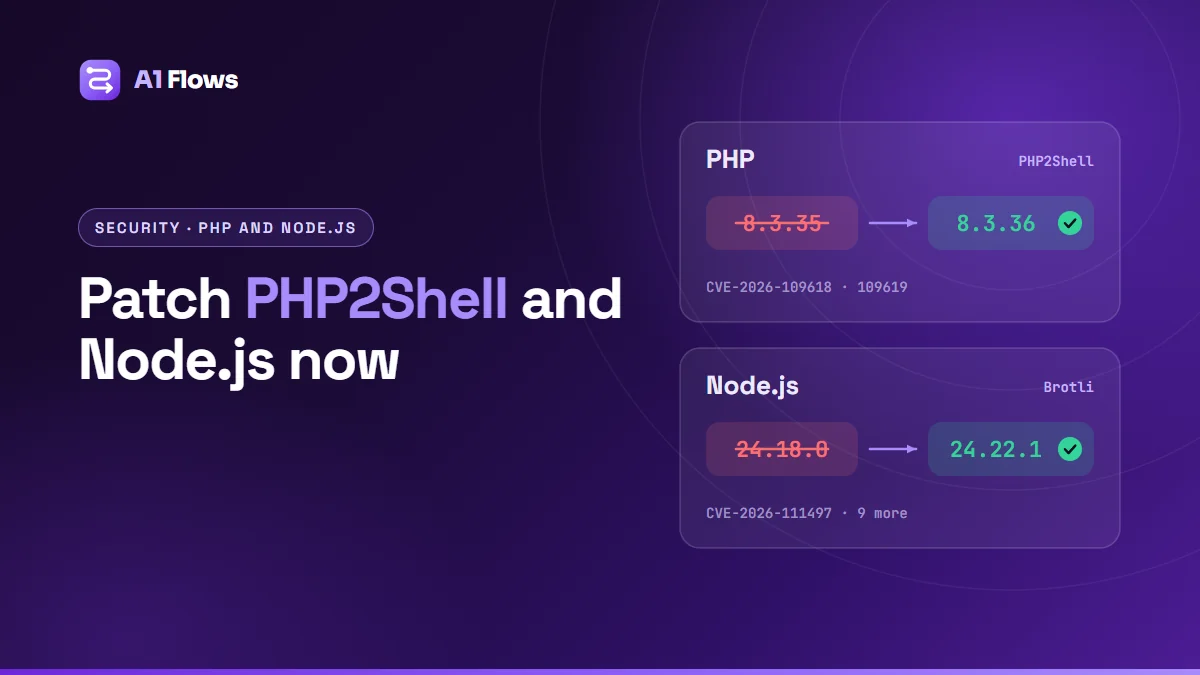
On 21 October 2026, PHP and Node.js both shipped emergency security releases. PHP 8.5.12, 8.4.27, 8.3.36 and 8.2.35 fix PHP2Shell (CVE-2026-109618 and CVE-2026-109619), two flaws that let an attacker run code on a server without logging in. Node.js 22.23.4, 24.22.1 and 26.12.1 fix ten vulnerabilities, the most serious a bug in its Brotli decoder (CVE-2026-111497). If your website runs on WordPress or any other PHP software, or you run Node.js services, check your versions today and update.
This guide explains what each flaw does, how to check whether your site and servers are affected, how to fix them on common hosting setups, and what to do if you cannot update straight away. The information is current as of 24 October 2026.
In this guide
- What happened on 21 October
- PHP2Shell: the two PHP flaws
- How to check your PHP version
- How to fix PHP2Shell
- If you cannot update PHP today
- The Node.js Brotli flaw and nine others
- How to fix Node.js
- What this means for your Zoho integrations
- Check for signs of compromise
- Frequently asked questions
What happened on 21 October
Two separate projects released security fixes on the same day:
- PHP released 8.5.12, 8.4.27, 8.3.36 and 8.2.35 at 14:00 UTC. Details of the flaws had leaked on 20 October, so the release was brought forward a day from its planned date of 22 October.
- Node.js released 22.23.4, 24.22.1 and 26.12.1, fixing ten vulnerabilities across its three supported release lines (Node.js advisory).
The PHP flaws are the more urgent of the two. Amazon’s threat intelligence team saw an exploitation attempt against one of its honeypots on 17 October, four days before the fixes were public, and the security firm watchTowr reported exploitation attempts from 21 October onwards. CISA issued an alert the same day urging organisations to patch immediately. As of 23 October, neither CVE had been added to CISA’s Known Exploited Vulnerabilities catalogue.
For the Node.js Brotli flaw, a public proof of concept exists, but it only achieved code execution against a deliberately weakened test build. As of 22 October, no exploitation in the wild had been reported.
PHP2Shell: the two PHP flaws
PHP2Shell is the name given to an exploit chain built on two bugs in the PHP engine itself, not in any application or plugin. Both are rated 9.2 (critical) under CVSS v4.0, and both can be exploited by a remote attacker who has no login.
- CVE-2026-109618 – remote code execution through out-of-memory corruption. If PHP runs out of memory while it is still setting up a request, the clean-up that follows can treat half-initialised data as valid.
- CVE-2026-109619 – remote code execution through stale global state. This is a use-after-free: internal state from one request can outlive the memory it points to, and the next request handled by the same PHP worker can use it before it is reset. PHP lists memory disclosure as a confirmed impact.
Because the bugs are in the engine, the application running on top does not matter, and every way of running PHP on a web server is in scope: Apache mod_php, PHP-FPM, php-cgi, LiteSpeed and FrankenPHP. PHP rates mod_php as the highest risk, because there an attack can succeed before any application code runs. For PHP-FPM and LiteSpeed, the advisory says the flaw is reachable, although no complete exploit had been demonstrated at release (PHP security advisory).
The affected code goes back to PHP 5.4.0, so every version from 5.4 to 8.5 is vulnerable until it is patched. PHP runs 69.3% of the websites whose server-side language is known, according to W3Techs, which is why this one matters to so many businesses.
| PHP branch | Fixed in | Notes |
|---|---|---|
| 8.5 | 8.5.12 | |
| 8.4 | 8.4.27 | |
| 8.3 | 8.3.36 | |
| 8.2 | 8.2.35 | Reaches end of life on 31 December 2026 |
| 7.4 to 8.1 | No official release | End of life. PHP published minimal source patches; otherwise use a vendor-patched package or upgrade |
| 5.4 to 7.3 | No fix | End of life. Upgrade |
On 23 October, PHP disclosed a third, related issue, CVE-2026-115560, in session upload progress. It only affects applications that switch session.serialize_handler to php at runtime while session upload progress is enabled. PHP considers that setup unlikely and will fix it in its next regular release; until then the mitigation is session.upload_progress.enabled=0. WordPress core does not use PHP sessions, although some plugins do.
How to check your PHP version
Check the version your website uses. The PHP on the command line can be a different build from the one serving your pages, so php -v on its own does not prove anything.
WordPress
In the WordPress admin, go to Tools > Site Health > Info and open Server. The PHP version line shows the exact version, for example 8.3.35. Anything below the fixed version for its branch is vulnerable.
cPanel hosting
MultiPHP Manager shows each domain’s PHP branch, such as “PHP 8.3 (ea-php83)”, but not the patch number. If your account has Terminal access, ask the binary directly:
/opt/cpanel/ea-php83/root/usr/bin/php -vReplace ea-php83 with the branch your domain uses. On CloudLinux servers, the alternative builds are under /opt/alt/php83/usr/bin/php.
Your own server or VPS
Check the package your web server actually runs, for example php8.3-fpm on Debian or Ubuntu, and compare it with your distribution’s security advisory. Distributions back-port fixes into their own version numbers, so a patched distribution package may not say 8.3.36. Vendor builds of end-of-life versions may not change the version number either; check the vendor’s advisory.
How to fix PHP2Shell
Updating PHP is the only complete fix. How you do it depends on where your site is hosted.
Managed WordPress hosting
Your host manages PHP for you. Check the version in Site Health. If it is still below the fixed version, contact the host and ask when the update will be applied.
Shared cPanel hosting
The host updates the PHP packages for the whole server; you cannot do it from your own account. Open a ticket asking them to update the EasyApache PHP packages to the fixed releases and restart the web server, then confirm the new version in Site Health.
Switching your domain to a newer branch in MultiPHP Manager does not help on its own. The packages for every branch are updated together, so if 8.3 has not been patched, 8.4 and 8.5 probably have not either. Changing branch also risks breaking plugins that are not ready for it.
Your own server or VPS
Install your distribution’s security updates, or upgrade to the fixed release, then restart every PHP process. The restart matters: PHP-FPM pools, LiteSpeed’s lsphp processes and Apache with mod_php keep running the old code until they restart.
# Debian / Ubuntu
sudo apt update && sudo apt upgrade
sudo systemctl restart php8.3-fpm

# RHEL / AlmaLinux / Rocky Linux
sudo dnf upgrade 'php*'
sudo systemctl restart php-fpm
Adjust the service name to your setup, and restart Apache as well if it runs PHP as a module.
End-of-life PHP (8.1 and older)
PHP will not release fixed versions for 8.1 or older. Upgrade to 8.2 or later, or use a package from a vendor that back-ports security fixes. CISA’s advice is blunt: take PHP systems that cannot be patched offline, including unsupported PHP 8.1 or earlier.
If you cannot update PHP today
PHP’s advisories list settings that reduce exposure while you wait for a patch. They do not make an installation safe; PHP says plainly that no configuration change fully mitigates these vulnerabilities.
memory_limit = -1– the main interim measure for CVE-2026-109618. Set it so applications cannot override it, and confirm nothing restores a finite limit.session.upload_progress.enabled = 0– for CVE-2026-109619, and for the newer CVE-2026-115560. On PHP 8.5, also setfatal_error_backtraces = 0.- Keep
post_max_sizeconservative and limit request size at the web server or firewall. If your application never accepts file uploads, blockmultipart/form-datarequests before they reach PHP. - Restart every PHP worker after changing any of these.
The advisory adds two warnings. Do not cap memory with RLIMIT_AS or RLIMIT_DATA: that makes memory allocation fail in exactly the way that triggers the bug. And a container or cgroup memory limit protects availability, but it is not a full mitigation.
On cPanel, you can set these values per domain in MultiPHP INI Editor. Site Health shows the new memory limit and post size once they take effect. Cloudflare has deployed firewall rules for known exploit patterns, but they only cover traffic that passes through Cloudflare and are a stopgap, not a fix.
The Node.js Brotli flaw and nine others
The Node.js release fixes ten vulnerabilities: four rated high, three medium and three low.
The one to know about is CVE-2026-111497, an out-of-bounds write in the Brotli decoder that Node.js bundles. A malformed Brotli stream passed to node:zlib can crash the process, disclose memory or, in the worst case, allow remote code execution. Attacker-controlled Brotli data can reach the decoder in more ways than you might expect:
- Outgoing requests.
fetch()automatically decompresses responses sent withContent-Encoding: br. Anything that fetches URLs it does not control – link previews, crawlers, webhook processors, importers – can be handed a malicious response. - Incoming request bodies. Express 5 uses body-parser 2, which added Brotli support, so
express.json()andexpress.urlencoded()decompress Brotli-encoded request bodies by default. - Direct use of the Brotli functions in
node:zlib.
The flaw is in the Brotli library itself, so other software that embeds it needs updating too; Brotli 1.0.10, 1.1.1 and 1.2.1 contain the fix. Against a standard Node.js build, the author of the public proof of concept reported a crash and limited memory disclosure rather than reliable code execution.
The other three high-severity fixes are in hostname and certificate checks:
- CVE-2026-105482 –
dns.resolve*()anddns.reverse()cut hostnames off at a NUL byte, so a lookup can return records for a different name. - CVE-2026-105483 and CVE-2026-106069 – unusual spellings of IPv4 addresses, with full-width digits or leading zeros, can make TLS check a certificate against a different address from the one actually connected to.
One medium-severity fix needs more than an upgrade. CVE-2026-106074 saves the entropy cache used by crypto.randomUUID() and crypto.randomInt() into startup snapshots and single executable applications, so every process started from one repeats the same values. If you build snapshots or single executables, rebuild them with a fixed version.
Node.js 20 and older get no fix. They are end of life, and the Node.js project treats end-of-life versions as affected by every security release. Some vendors still patch them: CloudLinux, which many shared hosts use, shipped fixed alt-nodejs builds for 18 and 20 on 22 October (CloudLinux announcement).
How to fix Node.js
Upgrade to the fixed version of your release line: 22.23.4, 24.22.1 or 26.12.1. If you are still on Node.js 20, move to 22 or 24.
- Find every copy. Run
node -von each server, and check the Node.js version in your Docker images and CI pipelines. - Update with your usual installer or package manager. On Windows,
winget upgrade OpenJS.NodeJS.LTS; with nvm,nvm install 24. - Restart every Node.js process. Running applications keep using the old binary until they restart. On cPanel hosting, restart the app from Setup Node.js App.
- Rebuild container images. Updating the host does not change the Node.js inside an image. Pull the new base image and rebuild.
- Update CI. A GitHub Actions workflow with
node-version: 20builds on an unpatched runtime. Change it to22or24and addcheck-latest: true, soactions/setup-nodedownloads the newest patch release instead of using an older cached one.
- uses: actions/setup-node@v4
  with:
    node-version: 24
    check-latest: true
If you cannot upgrade immediately, the Node.js project offers no runtime workaround for the Brotli flaw, but you can narrow the exposure:
- Reject compressed request bodies you do not need. In Express 5,
express.json({ inflate: false })refuses compressed bodies instead of decompressing them. - Only fetch from trusted hosts, and never fetch URLs that users supply.
- Restrict outbound network access from servers that do not need it, and watch for crashes and unexpected child processes.
What this means for your Zoho integrations
Zoho CRM, Books, Creator, Desk and the Deluge functions inside them run on Zoho’s own infrastructure. Patching that is Zoho’s job, and nothing in your Zoho account needs to change because of these releases.
The risk is in the pieces around Zoho that you host yourself, and most businesses have more of them than they realise:
- Website forms that send leads to Zoho CRM – a WordPress form plugin, or a webhook running on your website’s server.
- Integration middleware – PHP or Node.js scripts that receive Zoho webhooks, sync data with another system, or call the Zoho API on a schedule. Our guide to Zoho integration options covers when you need middleware at all.
- Build and deployment pipelines that run Node.js and hold credentials for your hosting.
Those servers usually hold the keys to your Zoho data: an OAuth client secret and refresh tokens, often in a config file. Remote code execution means an attacker can read that file and then use the Zoho API exactly as your integration does, without ever logging in to Zoho. If one of these servers ran an unpatched version and you find any sign of compromise, revoke the integration’s refresh tokens (Zoho’s OAuth revoke endpoint does this), create a new client in the Zoho API Console, and reconnect.
After patching, test each integration end to end: submit a website form and check the lead arrives in Zoho CRM, and trigger any Zoho workflow that calls a webhook on your server.
Check for signs of compromise
Exploitation attempts began before the fixes were public, so look back to at least 17 October 2026, the date of the earliest reported attempt, rather than just the day you patched.
On a WordPress site, check:
- Users > Administrator: every admin account is one you recognise.
- Plugins, including the Must-Use tab, where attackers like to hide code: nothing you did not install.
- Application Passwords, at the bottom of each admin’s profile: no entries you did not create.
wp-content/uploads: it should hold media, never.phpfiles.- Recently changed files, cron jobs you did not create, and the results of your host’s malware scanner.
On a server you manage, a quick first pass:
# PHP files in the uploads folder (there should be none)
find /path/to/wordpress/wp-content/uploads -name '*.php'

# PHP files changed since 17 October - review anything you did not update
find /path/to/site -type f -name '*.php' -newermt '2026-10-17'
If you find something you cannot explain, take the site offline or restrict access to it, patch PHP first, then restore from a backup you know is clean, ideally one from before 17 October. Then change the database password, the security keys in wp-config.php, every admin and application password, and any API tokens stored on the server.
Frequently asked questions
What is PHP2Shell?
PHP2Shell is an exploit chain built on two critical bugs in the PHP engine, CVE-2026-109618 and CVE-2026-109619. They let an attacker with no login run code on a server that uses a vulnerable version of PHP. PHP fixed both on 21 October 2026.
Which PHP versions fix PHP2Shell?
PHP 8.5.12, 8.4.27, 8.3.36 and 8.2.35, and anything newer in those branches. PHP 8.1 and older have no official fixed release.
Is WordPress affected by PHP2Shell?
Any WordPress site running on a vulnerable PHP version is exposed, because the bugs are in PHP, not in WordPress. Updating WordPress or its plugins does not fix it; updating PHP does. You can see the version under Tools > Site Health > Info > Server.
Will switching to PHP 8.5 fix it?
Only if the build you switch to is 8.5.12 or later. On shared hosting, every branch is usually updated at the same time, so if your current branch is unpatched, the others probably are too.
My host uses LiteSpeed or PHP-FPM. Am I safe?
No. Every way of running PHP on a web server is in scope. Apache mod_php carries the highest risk, but PHP-FPM and LiteSpeed still need the update.
Which Node.js versions fix CVE-2026-111497?
Node.js 22.23.4, 24.22.1 and 26.12.1. Node.js 20 and older receive no fix from the Node.js project.
Do I need to change anything in Zoho?
Not in Zoho itself. Check the servers you host that connect to Zoho, such as website forms and integration scripts. If one of them was compromised, revoke its Zoho tokens and reconnect it with a new client.
When to get help
Updating PHP or Node.js is usually quick. The harder part is knowing every place they run: an old integration server nobody remembers, a form plugin pushing leads into your CRM, a build pipeline still on Node.js 20.
If you would like help checking the scripts and servers that connect your systems to Zoho, our Zoho integration service is the place to start.